How to Send Boon Emails From Your Own Address
Last updated: October 9, 2026
Overview
Connect your company email in Settings → Branding, and Boon sends your referral program emails from that address instead of a generic Boon one. Setup takes about five minutes and is done once.
Once connected, every referral notification Boon sends to your admins, the employees who refer, and the candidates they refer comes from your address, including:
Invitations to join your referral program
Referral confirmations, tips, and status updates
Referral roundups announcing new job openings
Payout updates
Why it matters: employees recognize your company's address, so the emails land in their inbox, get opened, and get acted on. Messages from an unfamiliar sender are more likely to be filtered as spam or ignored, and that directly lowers referral activity.
Before you start
Do this before you send your first round of invitations, so every employee's first email from Boon comes from you.
Who does it: a Boon admin on your account.
Which mailbox: a mailbox someone can sign in to directly, because that sign-in is how Boon gets permission to send on its behalf. Group emails, distribution lists, and aliases have no sign-in of their own, so they can't be connected. Two options:
A dedicated notifications mailbox (recommended). Create a mailbox just for Boon, named in a way your employees will recognize and connect to your referral program, such as
referral-communications-noreply@yourcompany.comorprogramname-noreply@yourcompany.com(using your referral program's name). If your company already has a naming style for automated email, follow it so the sender feels familiar. Then decide how to handle replies, based on whether your team wants to see responses to notifications:Named no-reply, still monitored: the mailbox works like any other, so someone can check replies and auto-replies when needed.
True no-reply: your IT team configures the mailbox so it does not accept incoming mail, and nothing needs to be checked.
A real person's mailbox, such as your HR or talent lead, if you want invitations to feel personal. That person will receive the replies and auto-replies to Boon notifications.
What you need: the ability to sign in to that mailbox. Boon connects to both Google (Gmail and Google Workspace) and Microsoft (Outlook and Microsoft 365) mailboxes.
Company IT policy: if your company restricts which outside apps can connect to Google Workspace or Microsoft 365 accounts, your IT team may need to approve Boon first.
Step-by-step
Log in to your Boon account as an admin.
Click Settings in the left menu, then the Branding tab. Under Send From Your Company Email, click Connect Email.
Step 1 : Go to Boon Branding Settings (https://admin.goboon.co/settings/branding)
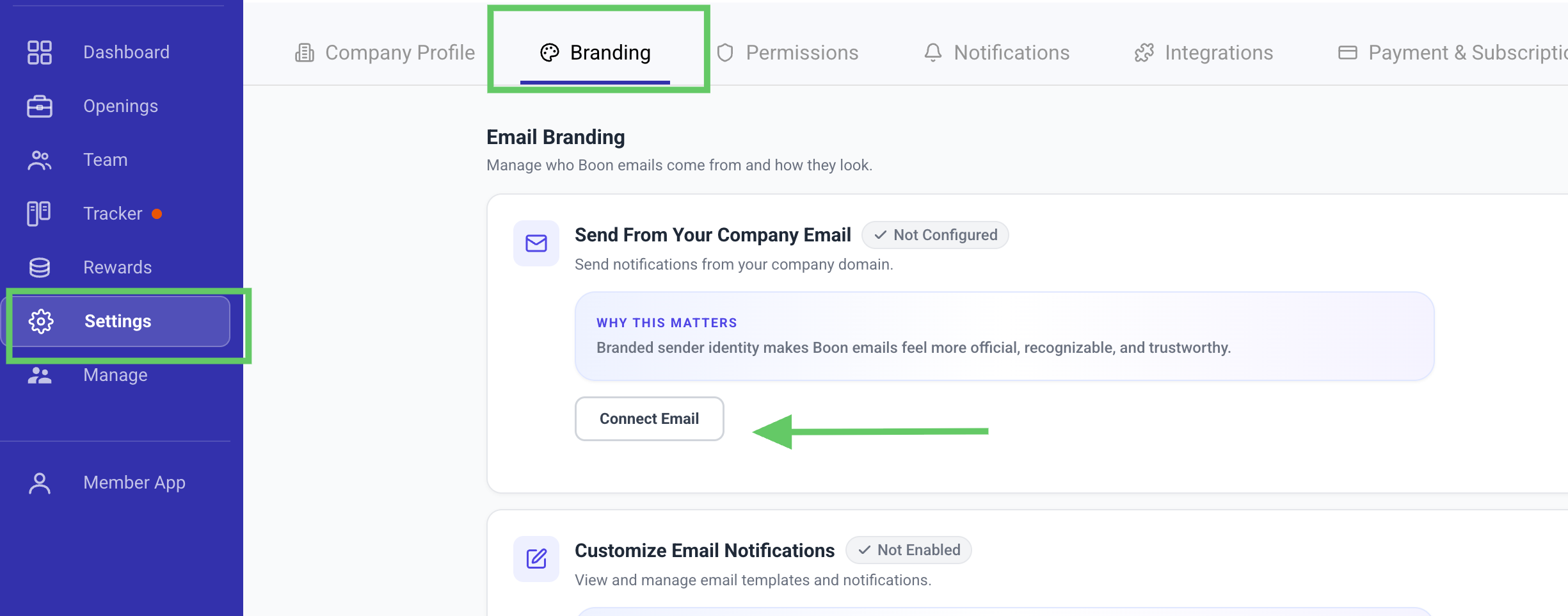
In the Setup Email Configuration window, click Connect with Google or Connect with Outlook

Sign in to the mailbox you want Boon emails to come from, then review the permission request and approve it. This lets Boon send email on that mailbox's behalf.
You return to the Branding page. The status now shows your connected address, and the button reads Manage Email.
Send a test: invite yourself or a colleague, and confirm the email arrives from your company address.
Once connected, all the referral emails listed in the Overview come from this address.
Keeping it connected
Please note: if the password for the connected mailbox changes, or if a person's own email is used and that person leaves your company, the connection will need to be updated. If referral notifications aren't reaching employees, this is the first place to check.
To check or update the connection: go to Settings → Branding and click Manage Email.
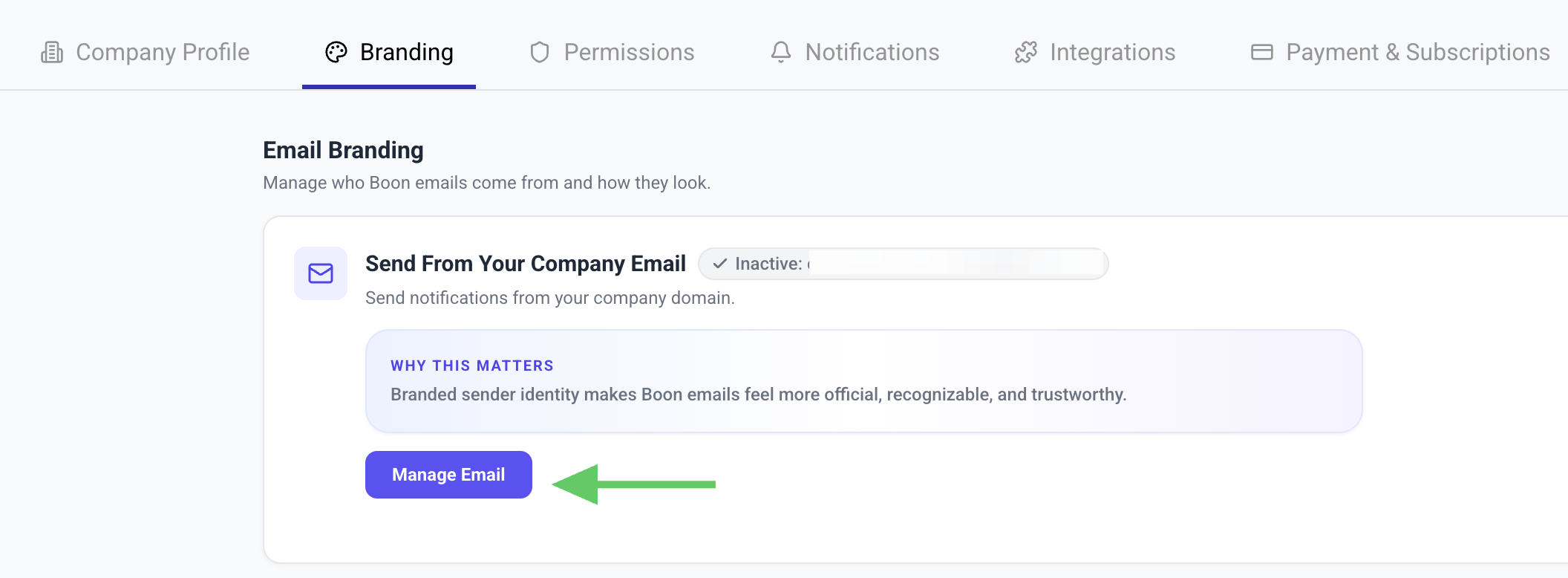
In the Current Configuration window you'll see the connected email, setup date, and provider. Click the blue refresh icon to reconnect the same mailbox (for example, after a password change), or the red trash icon to remove it so you can connect a different one.
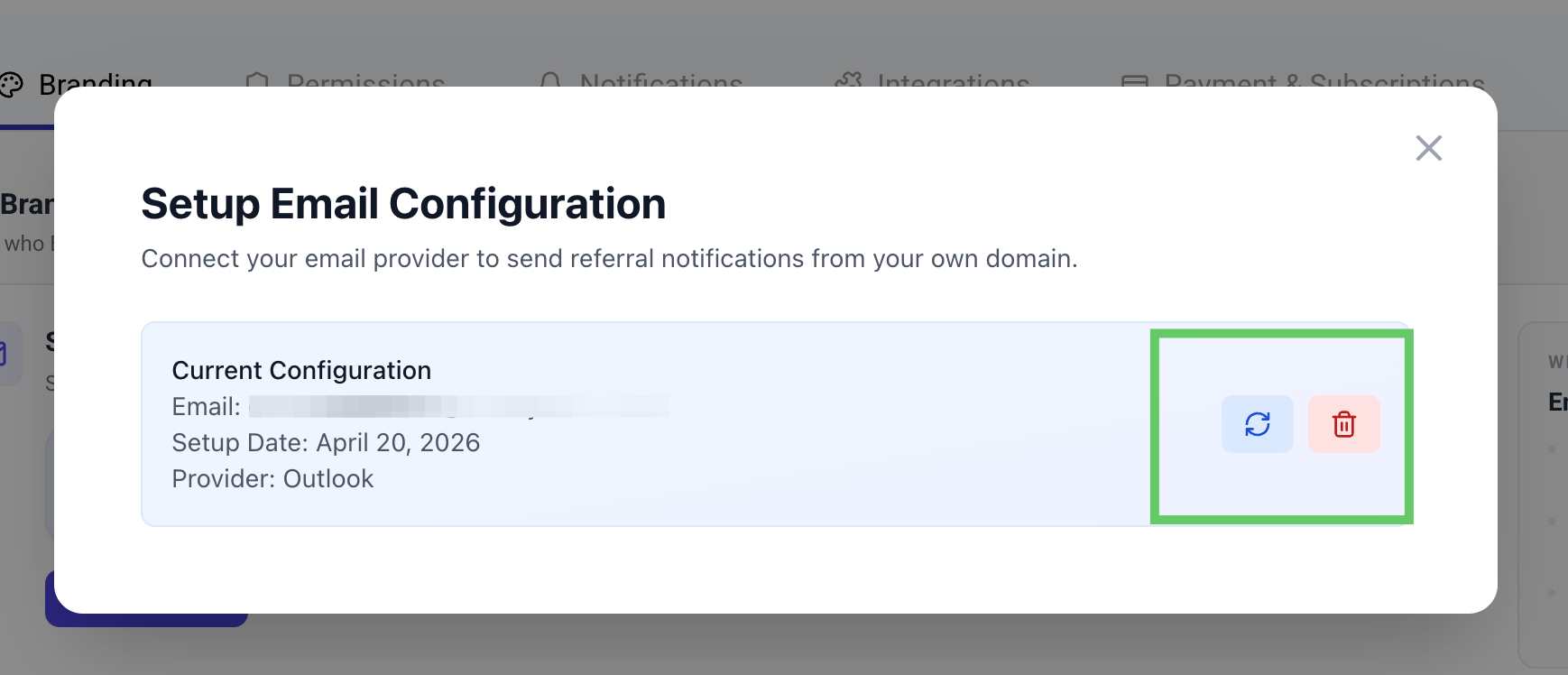
When someone leaves: if the connected mailbox belongs to a departing employee, switch to a dedicated notifications mailbox before their account is closed.
Troubleshooting and FAQ
Question | Answer |
|---|---|
Employees say they never got an invitation | Ask them to check spam, then check the connection under Settings → Branding → Manage Email and resend. |
Can I use a no-reply address? | Yes, and it's the recommended setup. Create a dedicated mailbox with "noreply" in the name. You can keep it monitored, or have IT set it up as a true no-reply that does not accept incoming mail; that's your team's call, based on whether you want to see responses. |
Will emails appear in the connected mailbox's Sent folder? | Expect them to, since Boon sends through that mailbox. |
Can I change the wording of the emails? | Connecting your email changes the sender address. Wording and design changes are handled separately; ask your Customer Success Manager what your plan includes. |
Who do I contact for help? | Your Boon Customer Success Manager, or support@goboon.co. |