Paying via ACH: Boon Account Subscription Invoices
Last updated: May 6, 2026
Boon account subscription invoices are paid securely through the invoice payment page. This ensures your payment is applied directly to the correct Boon account, invoice, and subscription balance.
To pay by ACH, open your invoice and select US bank account under payment options.
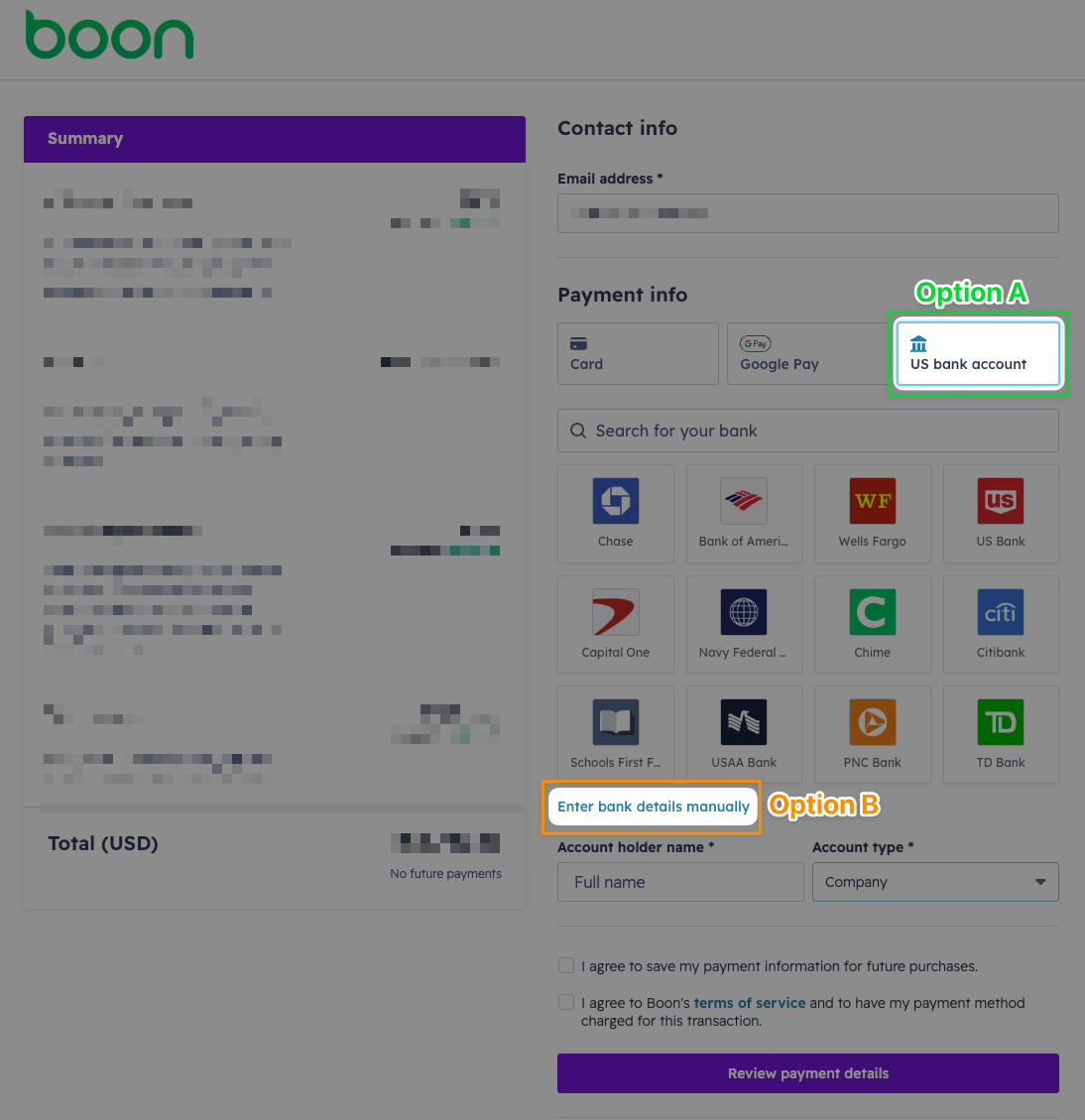
Option A: Search and select your bank
Use the search field to find your bank, then select it from the available options.
Selecting your bank will launch a secure, tailored workflow for your financial institution. Follow the prompts to connect your account and continue through the payment process.
Option B: Enter bank details manually
Select Enter bank details manually, then provide the required ACH information:
Routing number
Account number
Confirm account number
After your banking details are entered
Complete the remaining payment fields:
Enter the account holder name
Select the account type, typically Company for business accounts
Select the required authorization checkboxes
Review the payment details
Submit the payment
Once submitted, the payment will be processed and applied to your Boon account subscription invoice.
Seamless Invoice Payment Processing
Boon subscription invoice payments are submitted directly through the invoice payment page so your payment can be securely matched to the correct invoice, account, and subscription balance.
This keeps the process simple, traceable, and efficient from the moment payment is submitted. It also helps ensure your payment is applied promptly and accurately without delays caused by manual reconciliation.
ACH Payment FAQs:
Does paying by ACH mean Boon will automatically bill us?
Paying an invoice by ACH does not, by itself, enroll your account in automatic billing or create an open-ended authorization for future charges.
When you submit ACH payment through the invoice, you are authorizing payment for the specific invoice you are reviewing and submitting.
Some Boon accounts may have automatic billing enabled as part of their subscription setup or payment terms. That is handled separately from paying an individual invoice by ACH.
Does saving payment information mean we will be automatically billed?
Saving payment information is optional.
If you choose to save your payment information, it simply helps streamline future invoice payments. Saving payment information does not, by itself, authorize automatic billing or change your account’s billing arrangement.
Is paying by ACH secure?
Yes. ACH payments through Boon invoices are processed securely through our payment provider.
Your banking details are used to securely process the selected invoice payment.
Are there additional fees for paying by ACH?
Boon does not charge additional fees for paying your subscription invoice by ACH.
How do we make sure our payment is applied correctly?
Submit your Boon subscription payment directly through the invoice payment page. This allows the payment to be securely matched to the correct Boon account, invoice, and subscription balance.
Using the invoice payment page keeps the process simple, traceable, and efficient. It also helps ensure your payment is applied promptly and accurately without delays from manual review or reconciliation.
To pay by ACH, open the invoice, select US bank account, choose your bank or enter your bank details manually, review the payment information, and submit payment through the invoice page.
Who should we contact with questions?
For questions about your invoice or ACH payment, contact your customer account manager or Boon support.